 AGVHub
Fleet Manager as SaaS: Cloud Deployment for AGV Systems
How does a cloud-based fleet manager work? Architectures with on-premise MQTT broker, VPN connectivity, MQTT bridge, and the benefits of SaaS deployment for AGV fleets.
Overview
A fleet manager can run on-premise (on a local server in the plant) or as a cloud service (SaaS). Both approaches manage the same core functions — order distribution, route planning, deadlock prevention — but differ in where the software is hosted and how it connects to the vehicles.
When to consider SaaS:
- No dedicated on-premise server infrastructure available
- Preference for vendor-managed updates and maintenance
- Rapid deployment without local IT setup
- Maintaining high availability for a fleet manager requires more effort than maintaining a reliable internet connection, making cloud hosting an attractive option
Note: MQTT connections are typically secured with TLS encryption (MQTTS). All MQTT connections described in this article should be assumed to be encrypted.
MQTT in Customer Network
The MQTT broker runs in the customer network. The fleet manager in the cloud connects as an MQTT client to the local broker, optionally via a VPN tunnel.
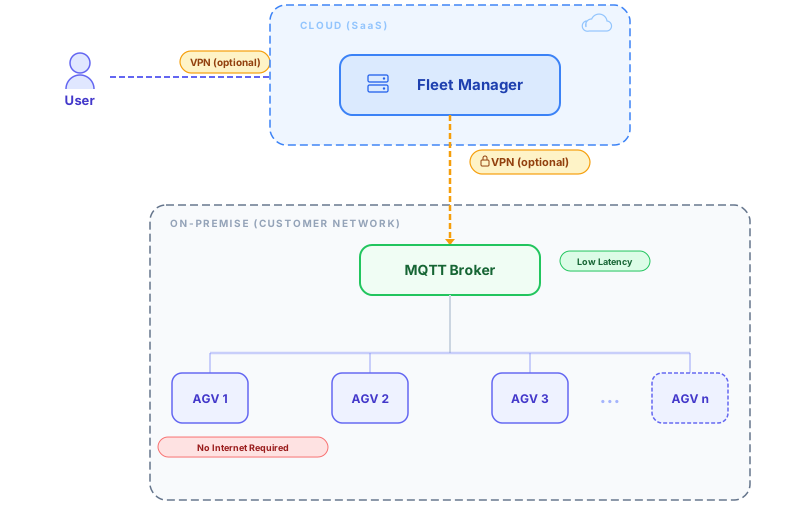
How It Works
- MQTT broker runs on a local server or industrial PC within the plant network
- AGVs connect to the MQTT broker via WiFi — low latency, no internet required
- Fleet manager (cloud) connects as an MQTT client to the local broker, optionally via a VPN tunnel
- All vehicle commands and status messages flow through MQTT as usual — the AGVs don't know (or care) that the fleet manager is remote
Benefits of This Approach
- Low latency for vehicle control — MQTT communication between broker and AGVs stays local
- No internet required for AGVs — vehicles only need WiFi access to the plant network
- Minimal internet exposure — only one connection from the fleet manager to the broker, not every vehicle
- Simple network setup — AGVs connect to a local broker, no firewall changes per vehicle
- Resilience — if the internet connection drops temporarily, the MQTT broker can buffer messages
Alternative: MQTT Bridge
Instead of the fleet manager connecting directly to a broker in the customer network, an MQTT bridge setup can be used. Local MQTT brokers run as bridges in the customer network, forwarding relevant topics across network zones to the MQTT broker in the cloud.
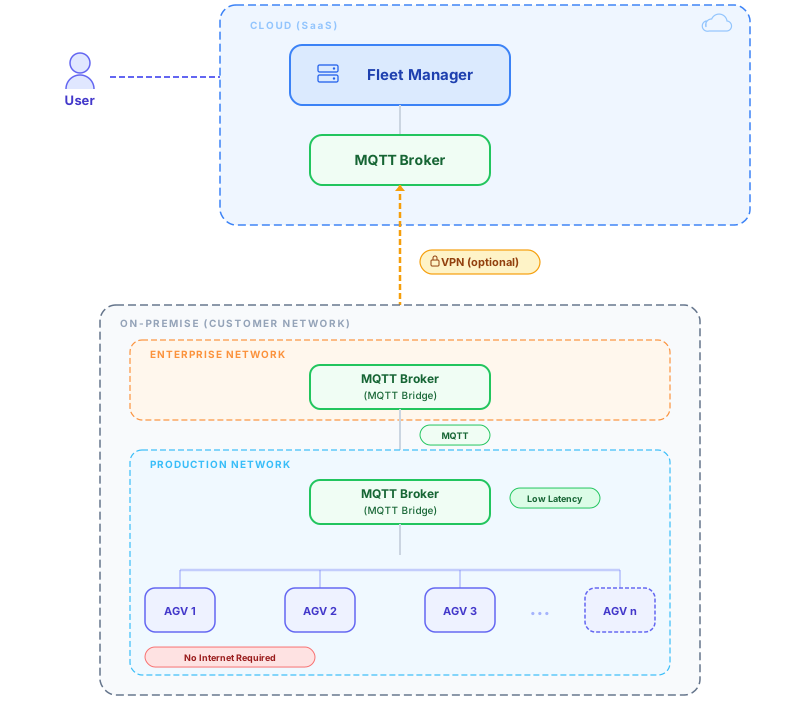
How It Works
- AGVs connect to a local MQTT broker in the production network via WiFi — low latency, no internet required
- MQTT bridge (production) forwards relevant topics to the MQTT broker in the enterprise network
- MQTT bridge (enterprise) forwards the topics to the cloud MQTT broker via an outbound MQTT connection
- Fleet manager (cloud) connects to the cloud MQTT broker and receives all vehicle data through the bridge chain
Benefits of This Approach
- No direct cloud connection from the fleet manager — the bridge initiates the outbound connection to the cloud broker
- Low latency for vehicle control — MQTT communication between broker and AGVs stays local
- Simple firewall configuration — only an outbound MQTT connection from the enterprise network needs to be allowed
- Network zone compatible — bridges can be cascaded across multiple network segments (production → enterprise → cloud)
- Buffering on connection loss — the local broker stores messages until the bridge connection is re-established
Alternative: Full Cloud
It is also possible to run both the fleet manager and the MQTT broker in the cloud. In this setup, AGVs connect directly to a cloud-hosted MQTT broker over the internet.
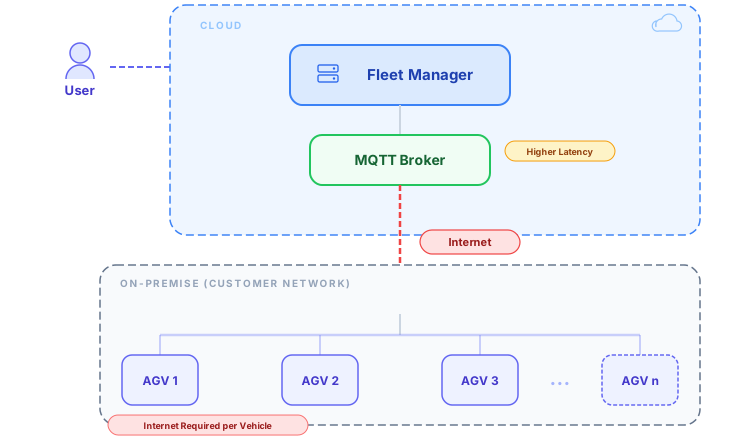
How It Differs
- Every AGV requires a reliable internet connection
- All MQTT traffic travels over the internet, increasing latency
- More complex network configuration (firewall rules, NAT traversal for each vehicle)
- Higher dependency on internet availability for vehicle operation
- On connection loss, vehicles must republish messages once reconnected. In the other architectures, the local broker buffers messages during outages
This approach can work for outdoor AGVs or campus scenarios where plant-local networking is impractical, but it is not recommended for typical indoor fleet deployments.
Architecture Comparison
| Criterion | MQTT in Customer Network | MQTT Bridge | Full Cloud |
|---|---|---|---|
| AGV-to-Broker Latency | < 5 ms (local) | < 5 ms (local) | 20-100+ ms (internet) |
| Internet for AGVs | No | No | Yes, per vehicle |
| Cloud Connection | Fleet Manager connects as MQTT client | Bridge initiates outbound connection | Each vehicle connects directly |
| MQTT Broker Location | Customer network | Cloud + local bridges | Cloud |
| Network Complexity | Low — single connection | Low — outbound MQTT connection | High — per-vehicle connectivity |
| Offline Resilience | Broker buffers locally | Bridge buffers locally | Vehicles lose connection |
| Network Zones | Single network zone | Bridge cascading supported | Direct internet connection |
| Best For | Simple network, single zone | Multi-zone networks, segmented IT | Outdoor / campus scenarios |
Benefits of SaaS Deployment
Regardless of where the MQTT broker runs, hosting the fleet manager as SaaS offers operational advantages:
Automatic Updates
Software updates are managed by the vendor and included in the subscription. No manual patching or upgrade cycles — the fleet manager is always on the latest version.
Multi-Site Management
A single cloud instance can manage fleets across multiple locations. Central dashboards provide an overview of all sites without separate installations per plant.
Rapid Deployment
No server procurement, no OS installation, no local IT setup. A new fleet can be connected in hours instead of days.
No On-Premise IT Staff
Server maintenance, backups, and security patches are handled by the SaaS provider. Plants without dedicated IT personnel can still operate a fleet manager.